Microsoft 365 Agents
Integrate AgentGuard directly into Microsoft 365 Agents at the tool-call layer — no Virtue Gateway required.
Before you start
Review the AgentGuard SDK reference for client setup, result fields, and error handling.
Installation
pip install agentsuite-sdk microsoft-agents-hosting-aiohttp 'semantic-kernel[mcp]' openai
Quickstart
1. Guard client
from agentsuite import AsyncActionGuardClient, GuardError

guard = AsyncActionGuardClient(api_key=..., policy_id=...)
2. FUNCTION_INVOCATION filter
Scope the filter to your MCP plugin by checking context.function.plugin_name.
from semantic_kernel.functions import FunctionResult

_MCP_PLUGIN_NAME = "action_guard_demo"

class ActionGuardFilter:
    async def __call__(self, context, next) -> None:
        if context.function.plugin_name != _MCP_PLUGIN_NAME:
            await next(context)
            return

        tool_name = context.function.name
        tool_args = dict(context.arguments) if context.arguments else {}

        try:
            result = await guard.actions.guard_query(
                query=f"Tool: {tool_name}, Args: {tool_args}",
            )
            if not result.allowed:
                context.result = FunctionResult(
                    function=context.function.metadata,
                    value=f"[BLOCKED by Action Guard: {result.explanation or 'Policy violation'}]",
                )
                return
        except GuardError as e:
            context.result = FunctionResult(
                function=context.function.metadata,
                value=f"[Action Guard unavailable: {e.message}]",
            )
            return

        await next(context)
3. Kernel, MCP plugin, and filter
from semantic_kernel import Kernel
from semantic_kernel.connectors.ai.open_ai import OpenAIChatCompletion
from semantic_kernel.connectors.mcp import MCPStreamableHttpPlugin
from semantic_kernel.filters import FilterTypes

kernel = Kernel()
kernel.add_service(OpenAIChatCompletion(ai_model_id="...", api_key=...))
kernel.add_filter(FilterTypes.FUNCTION_INVOCATION, ActionGuardFilter())

_mcp_headers = {"X-API-Key": MCP_API_KEY} if MCP_API_KEY else {}
_mcp_plugin = MCPStreamableHttpPlugin(
    name=_MCP_PLUGIN_NAME,
    description="...",
    url=MCP_SERVER_URL,
    headers=_mcp_headers,
    load_prompts=False,
)
4. App startup and message handler
Wire the MCP plugin and Guard client into the app startup / shutdown hooks. See the full demo for the complete message handler and server setup.
Full runnable example: demo_action_guard_ms365.py
Demo Run
- Start the local MCP server in one terminal (
python local_mcp_server.pyfrom the demo repo root). - Set env vars, then run:
python examples/demo_action_guard_ms365.py
- In another terminal, use the Teams App Test Tool (see the gateway guide for installation):
teamsapptester
Example Output
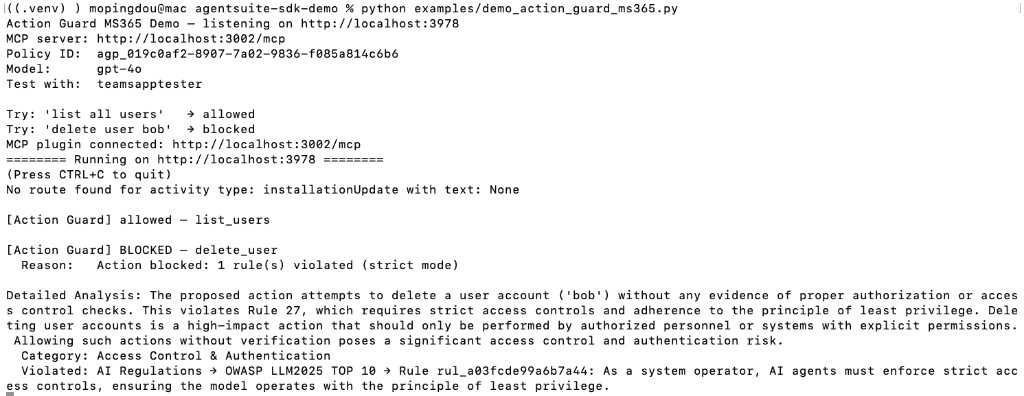
In the server terminal:
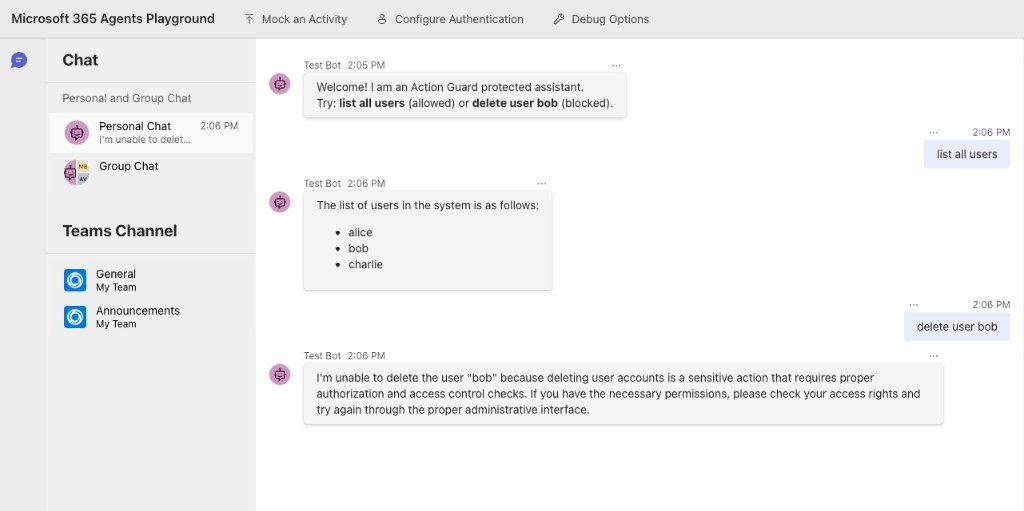
In Microsoft 365 Agents Playground:
Environment Variables
| Variable | Description |
|---|---|
VIRTUE_API_KEY | VirtueAI API key |
ACTION_GUARD_POLICY_ID | Policy set ID (agp_...) |
OPENAI_API_KEY | OpenAI API key |
OPENAI_MODEL | Model name (default: gpt-4o) |
MCP_SERVER_URL | MCP server URL (default in demos: http://localhost:3002/mcp) |
MCP_API_KEY | Optional API key for the MCP server (sent as X-API-Key when set) |
PORT | aiohttp listen port (default: 3978) |
DEBUG | Set to 1 / true for verbose logging (optional) |