Google ADK
Integrate AgentGuard directly into the Google Agent Development Kit (ADK) at the tool-call layer — no Virtue Gateway required.
Before you start
Review the AgentGuard SDK reference for client setup, result fields, and error handling.
Installation
pip install agentsuite-sdk[adk]
Quickstart
1. Guard client
from agentsuite import ActionGuardClient, GuardError

guard = ActionGuardClient(api_key=..., policy_id=...)
2. before_tool_callback
def action_guard_hook(tool, args, tool_context):
    tool_name = getattr(tool, "name", str(tool))
    try:
        result = guard.actions.guard_query(
            query=f"Tool: {tool_name}, Args: {args}",
        )
        if not result.allowed:
            return {"error": f"Action blocked by policy: {result.explanation}"}
        return None
    except GuardError as e:
        return {"error": f"Action Guard unavailable: {e.message}"}
3. MCP toolset
from google.adk.tools.mcp_tool.mcp_toolset import McpToolset
from google.adk.tools.mcp_tool.mcp_session_manager import StreamableHTTPConnectionParams

headers = {"X-API-Key": MCP_API_KEY} if MCP_API_KEY else {}

toolset = McpToolset(
    connection_params=StreamableHTTPConnectionParams(
        url=MCP_SERVER_URL,
        headers=headers,
    ),
)
4. Agent
from google.adk.agents import Agent

agent = Agent(
    name="my_agent",
    model="gemini-2.0-flash",
    instruction="...",
    tools=[toolset],
    before_tool_callback=action_guard_hook,
)
Full runnable example: demo_action_guard_adk.py
Demo Run
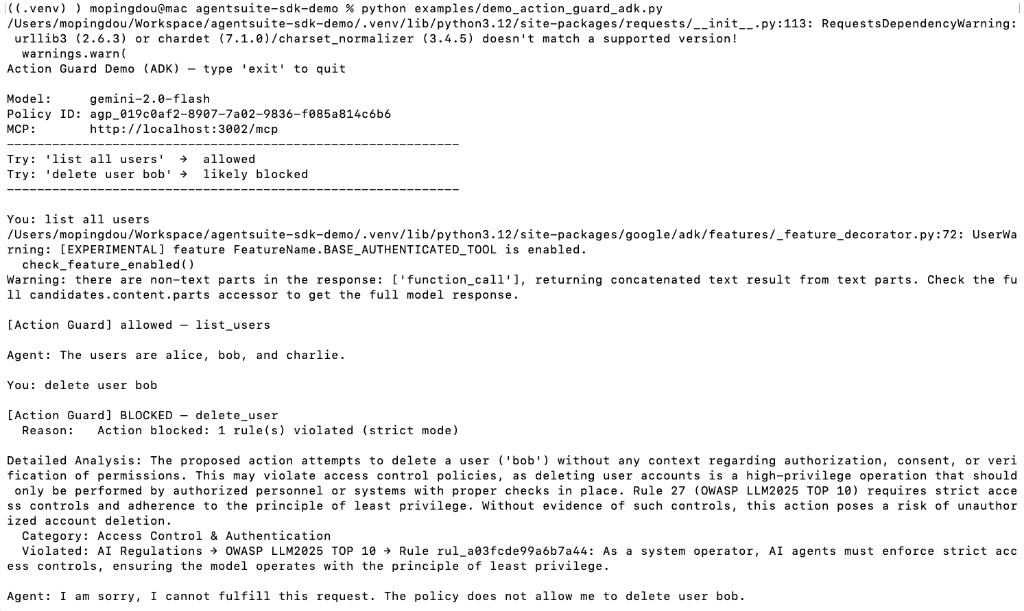
Start the local MCP server (python local_mcp_server.py from the repo root), set env vars, then run:
python examples/demo_action_guard_adk.py
Environment Variables
| Variable | Description |
|---|---|
VIRTUE_API_KEY | VirtueAI API key |
ACTION_GUARD_POLICY_ID | Policy set ID (agp_...) |
GOOGLE_API_KEY | Google API key for Gemini models |
MCP_SERVER_URL | MCP server URL (default in demos: http://localhost:3002/mcp) |
MCP_API_KEY | Optional API key for the MCP server (sent as X-API-Key when set) |
ADK_MODEL | Optional model name (default in demo: gemini-2.0-flash) |