VirtueGuard-Code Setup Guide
Introduction
VirtueGuard-Code automatically identifies vulnerabilities in AI-generated code directly inside your IDE. It is the first specialized reasoning language model purpose-built for vulnerability detection in source code — trained end-to-end on vulnerability reasoning, achieving state-of-the-art accuracy at a fraction of the size and cost of frontier commercial models. The result: real-time security review that runs on every file save without breaking developer flow.
The model is shipped as a managed API behind a VS Code–compatible extension for VS Code, Cursor, and Windsurf, plus a dashboard with detailed CWE-level reports, model-reasoning trace, and live monitoring. Both auto-scan-on-save and on-demand manual analysis are supported.
VirtueGuard-Code is part of the VirtueGuard family. It complements TextGuard Lite, ImageGuard, VideoGuard, and AudioGuard, and pairs naturally with PolicyGuard for organization-specific code policies.
Why VirtueGuard-Code
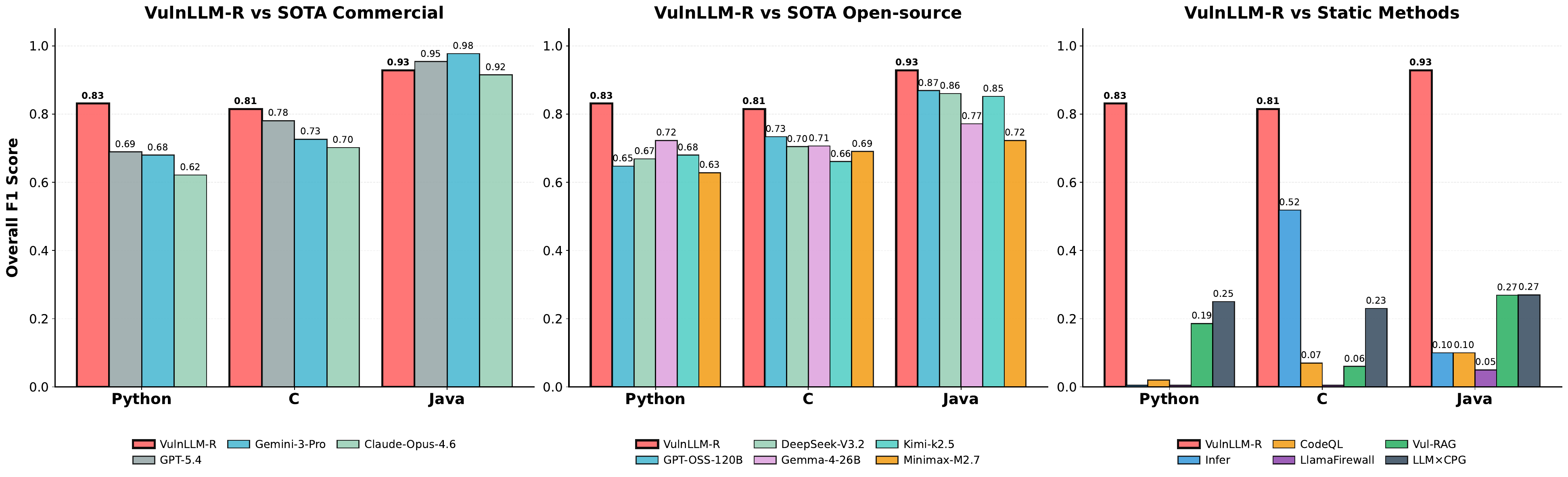
- Outperforms SOTA commercial models on the standard vulnerability-detection benchmarks (SecCodePLT, Juliet 1.3, PrimeVul, ARVO, SVEN, Vul4J) across Python, C/C++, and Java — including GPT-5, Gemini-3-Pro, Claude-Opus-4.6, and Grok-4.20 — at ~30× smaller model size.
- 5–10× lower per-sample latency than commercial reasoning models, enabling auto-analyze-on-save with no perceptible delay.
- Generalizes to unseen CWEs — the model learns vulnerability-reasoning patterns rather than memorizing per-CWE examples, validated against held-out CWE categories.
- Discovered 10 zero-day vulnerabilities in actively maintained open-source projects (
libredwg,htslib,SELinux,libxml2), all responsibly disclosed upstream. - Beats traditional static analysis (CodeQL, Infer) and LLM-augmented tools (LLMxCPG, Vul-RAG, RepoAudit, LlamaFirewall) on the same benchmarks.
Performance
Accuracy vs. Model Size
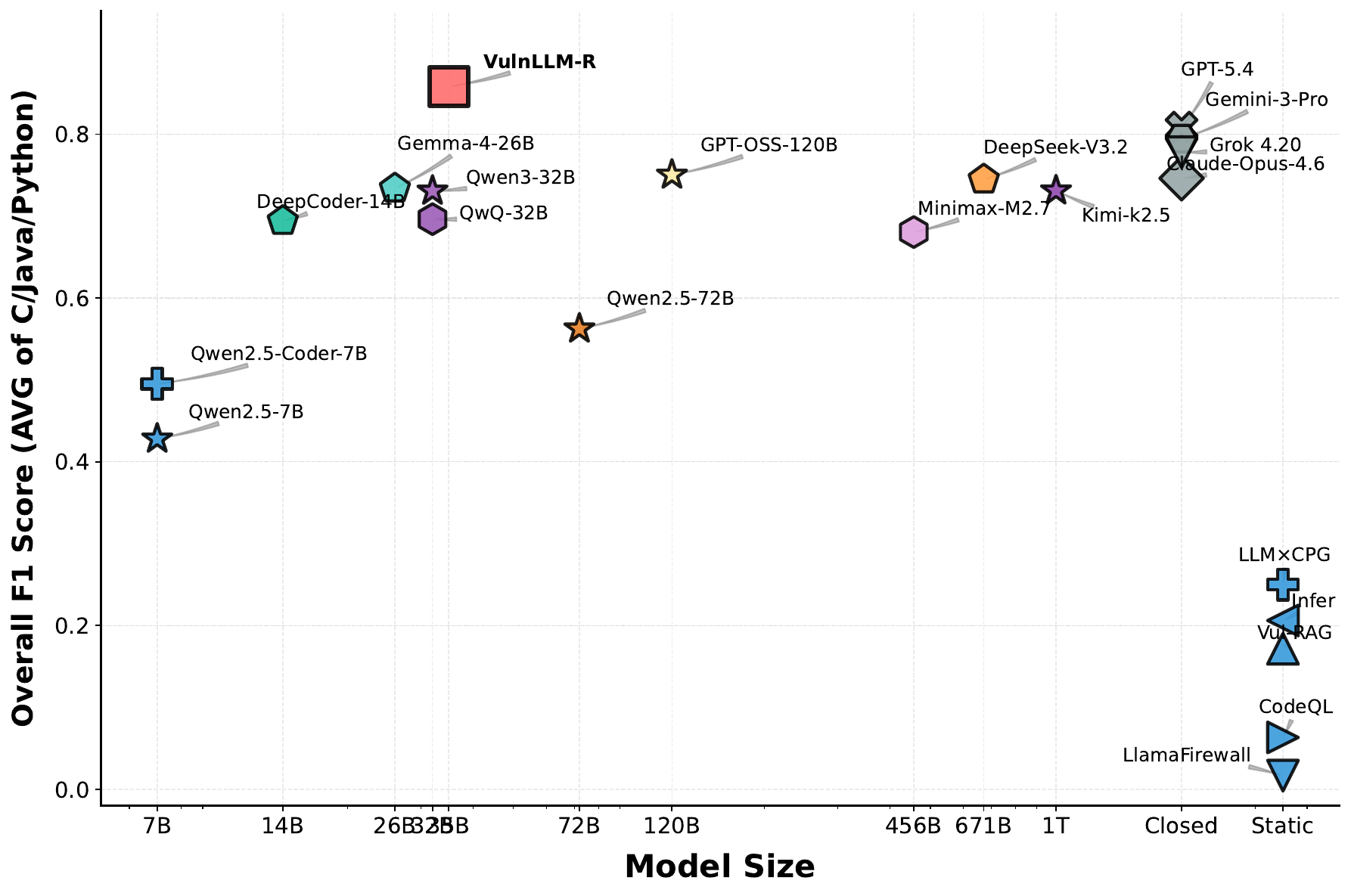
VirtueGuard-Code achieves the highest F1 of any evaluated model on our consolidated benchmark — including every closed-source commercial frontier model — despite being a small specialized model. The model occupies a unique point in the Pareto frontier: SOTA accuracy at a parameter budget two orders of magnitude smaller than the closest competitor.
Speed vs. Accuracy
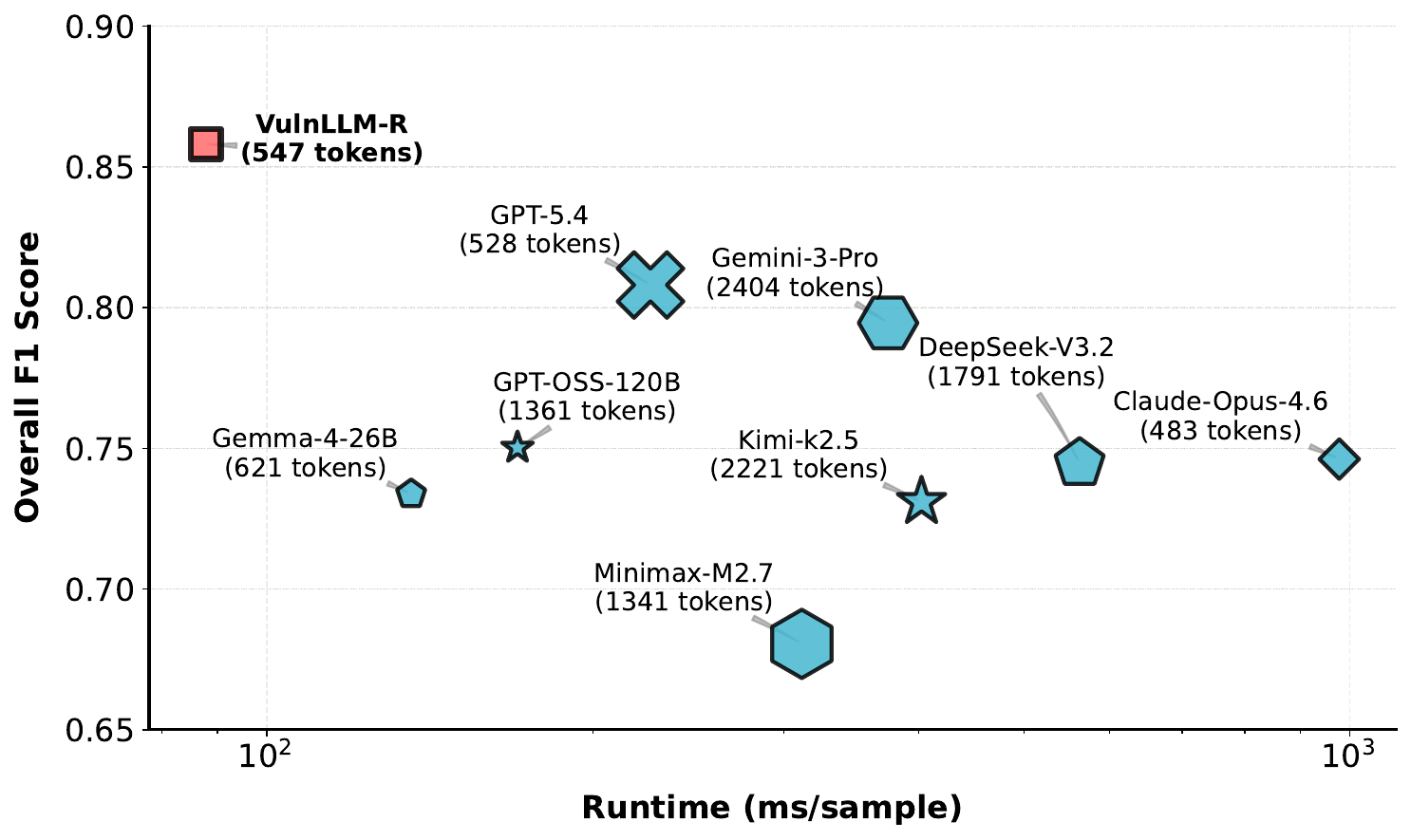
VirtueGuard-Code sits in the top-left of the speed–accuracy frontier: the fastest model on the chart is also the most accurate. Average runtime per sample is roughly 5–10× lower than commercial reasoning models in the same accuracy bracket, while average output length (547 tokens) is shorter than every commercial reasoning competitor.
Per-Language Breakdown
Per-language F1 against three baseline families (SOTA commercial, SOTA open-source, classical static analysis):
Vulnerability Coverage
VirtueGuard-Code ships with the following CWE coverage by default across Python, C/C++, and Java. Custom CWE categories and per-project policies are supported via the dashboard.
Python
| CWE | Description |
|---|---|
| CWE-74 | Improper Neutralization of Special Elements (Injection) |
| CWE-78 | OS Command Injection |
| CWE-89 | SQL Injection |
| CWE-94 | Code Injection (eval / exec) |
| CWE-200 | Exposure of Sensitive Information |
| CWE-295 | Improper Certificate Validation |
| CWE-327 | Use of Broken / Risky Cryptographic Algorithm |
| CWE-352 | Cross-Site Request Forgery (CSRF) |
| CWE-367 | Time-of-Check Time-of-Use (TOCTOU) Race Condition |
| CWE-400 | Uncontrolled Resource Consumption |
| CWE-502 | Deserialization of Untrusted Data |
| CWE-611 | XML External Entity (XXE) Reference |
| CWE-863 | Incorrect Authorization |
| CWE-915 | Improperly Controlled Dynamic Attribute Modification |
| CWE-918 | Server-Side Request Forgery (SSRF) |
C / C++
| CWE | Description |
|---|---|
| CWE-22 | Path Traversal |
| CWE-23 | Relative Path Traversal |
| CWE-89 | SQL Injection |
| CWE-94 | Code Injection |
| CWE-121 | Stack-Based Buffer Overflow |
| CWE-134 | Use of Externally-Controlled Format String |
| CWE-176 | Improper Handling of Unicode Encoding |
| CWE-191 | Integer Underflow (Wrap or Wraparound) |
| CWE-287 | Improper Authentication |
| CWE-307 | Improper Restriction of Excessive Authentication Attempts |
| CWE-319 | Cleartext Transmission of Sensitive Information |
| CWE-327 | Use of Broken / Risky Cryptographic Algorithm |
| CWE-338 | Use of Cryptographically Weak Pseudo-Random Number Generator |
| CWE-352 | Cross-Site Request Forgery (CSRF) |
| CWE-367 | Time-of-Check Time-of-Use (TOCTOU) Race Condition |
| CWE-369 | Divide By Zero |
| CWE-400 | Uncontrolled Resource Consumption |
| CWE-416 | Use After Free |
| CWE-457 | Use of Uninitialized Variable |
| CWE-502 | Deserialization of Untrusted Data |
| CWE-758 | Reliance on Undefined, Unspecified, or Implementation-Defined Behavior |
| CWE-761 | Free of Pointer Not at Start of Buffer |
| CWE-798 | Use of Hard-Coded Credentials |
| CWE-843 | Type Confusion |
| CWE-862 | Missing Authorization |
| CWE-863 | Incorrect Authorization |
Java
| CWE | Description |
|---|---|
| CWE-23 | Relative Path Traversal |
| CWE-78 | OS Command Injection |
| CWE-89 | SQL Injection |
| CWE-90 | LDAP Injection |
| CWE-134 | Use of Externally-Controlled Format String |
| CWE-190 | Integer Overflow or Wraparound |
| CWE-191 | Integer Underflow |
| CWE-319 | Cleartext Transmission of Sensitive Information |
| CWE-327 | Use of Broken / Risky Cryptographic Algorithm |
| CWE-369 | Divide By Zero |
| CWE-400 | Uncontrolled Resource Consumption |
| CWE-476 | NULL Pointer Dereference |
| CWE-526 | Cleartext Storage of Sensitive Information in Environment Variable |
| CWE-601 | URL Redirection to Untrusted Site (Open Redirect) |
Real-World Validation
Beyond benchmark performance, VirtueGuard-Code has been validated at the project level on real OSS-Fuzz codebases used in the DARPA AIxCC competition: nginx, FreeRDP, libexif, Tika, and ZooKeeper. In head-to-head comparisons:
- VirtueGuard-Code consistently outperformed classical tools (CodeQL, AFL++, Jazzer) and LLM-augmented baselines (RepoAudit, G²Fuzz) in true-positive count.
- Compared to frontier commercial models in agentic scaffolds, VirtueGuard-Code achieved the lowest false-positive rate while maintaining competitive recall — for example, on FreeRDP, commercial models flagged thousands of functions as vulnerable, whereas VirtueGuard-Code's output was orders of magnitude more selective.
- Detection completes within one hour per project, versus 24 hours per harness for fuzzing-based approaches.
Deployed on the latest versions of four additional widely-used projects (libredwg, htslib, SELinux, libxml2), VirtueGuard-Code's agent discovered 10 distinct zero-day vulnerabilities, all responsibly disclosed and currently being remediated by the affected projects.
Setup
1. Install the extension
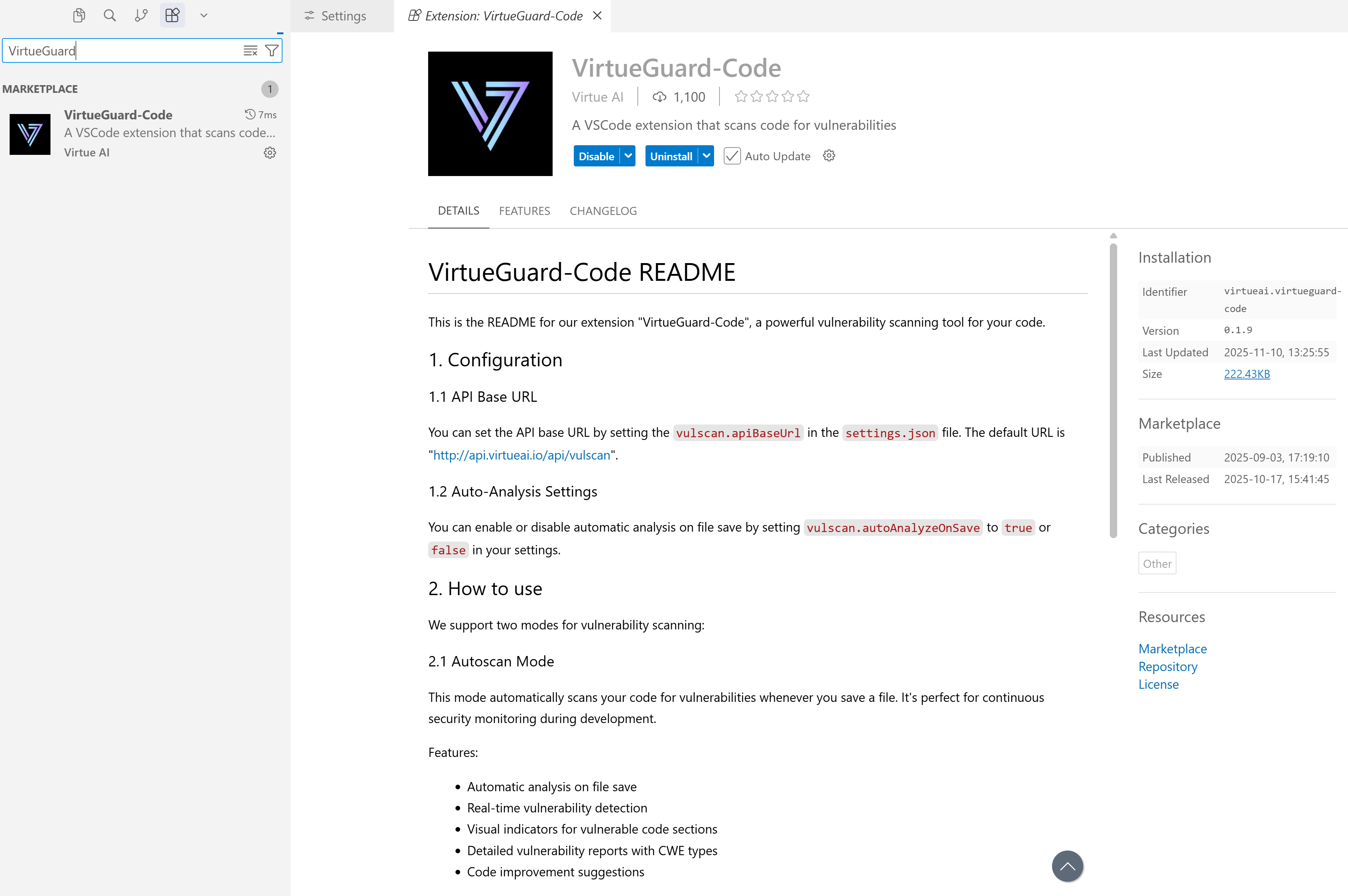
Install the VirtueGuard-Code extension from the marketplace of VS Code, Cursor, or Windsurf.
2. Get your API key
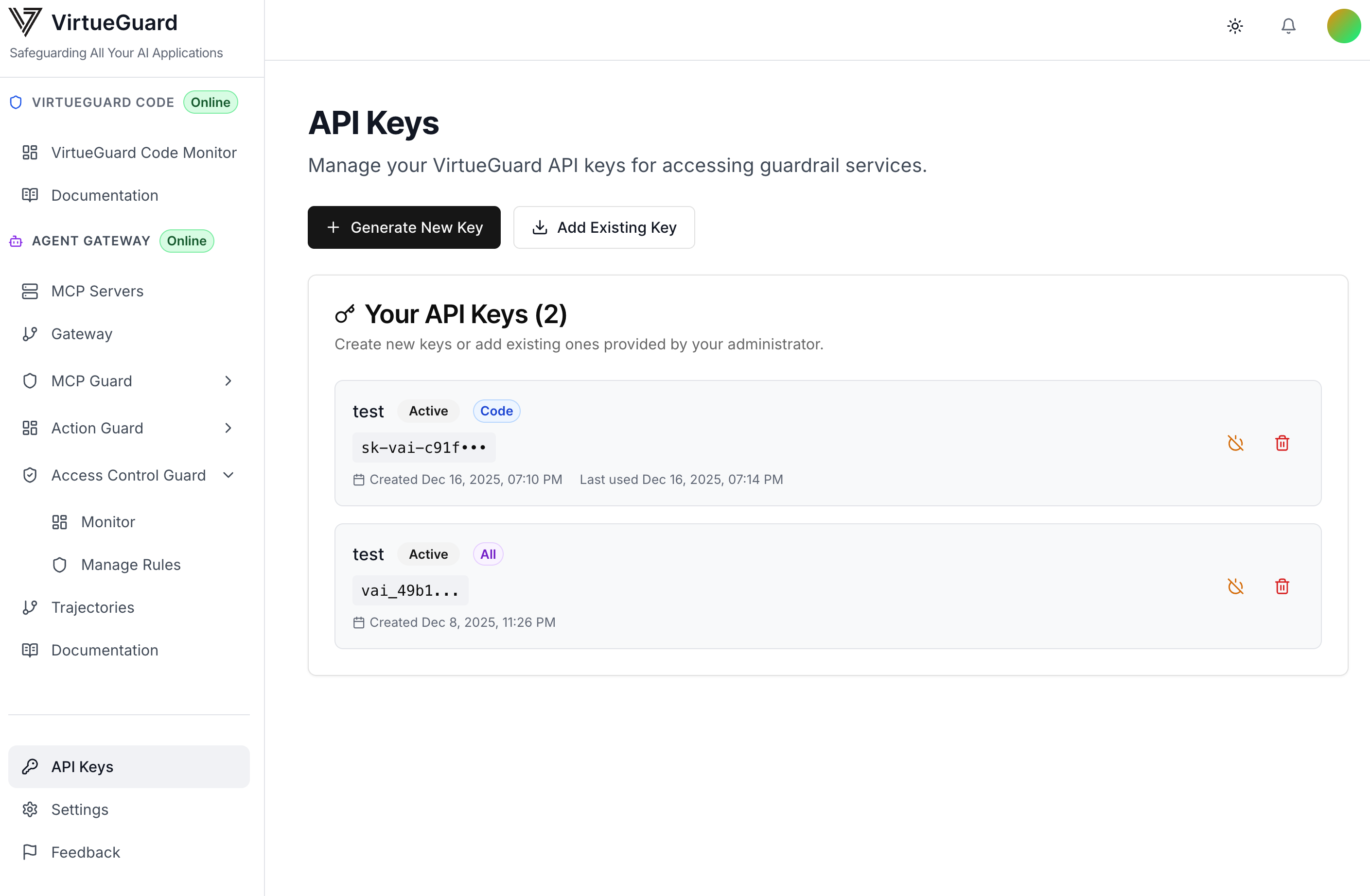
Log into the VirtueGuard platform with your username and password. Navigate to API Keys in the bottom-left corner of the dashboard sidebar and open the API key management page.
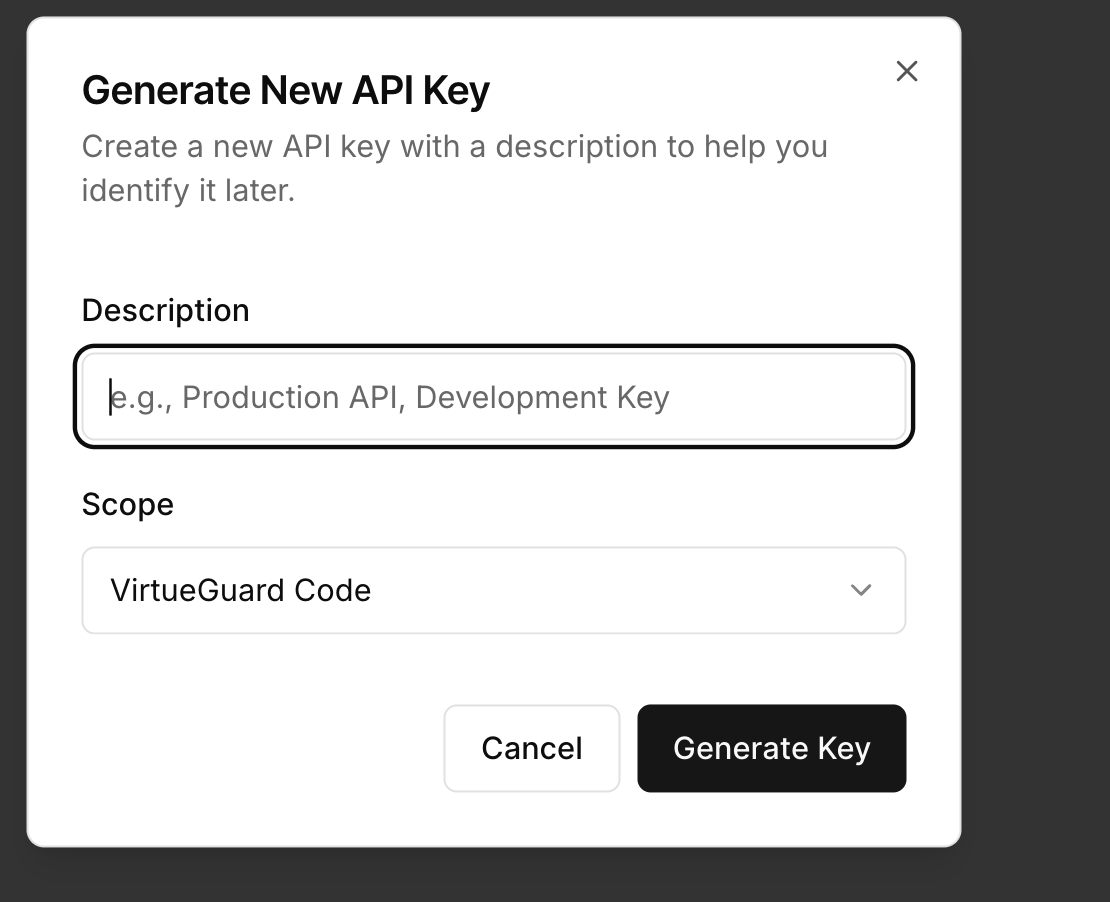
Click Generate New Key and select the scope as Code Guard (virtueguard-code). Copy the key immediately — it is only shown once and cannot be retrieved later.
3. Configure the extension
Open the IDE plugin settings and configure as follows:
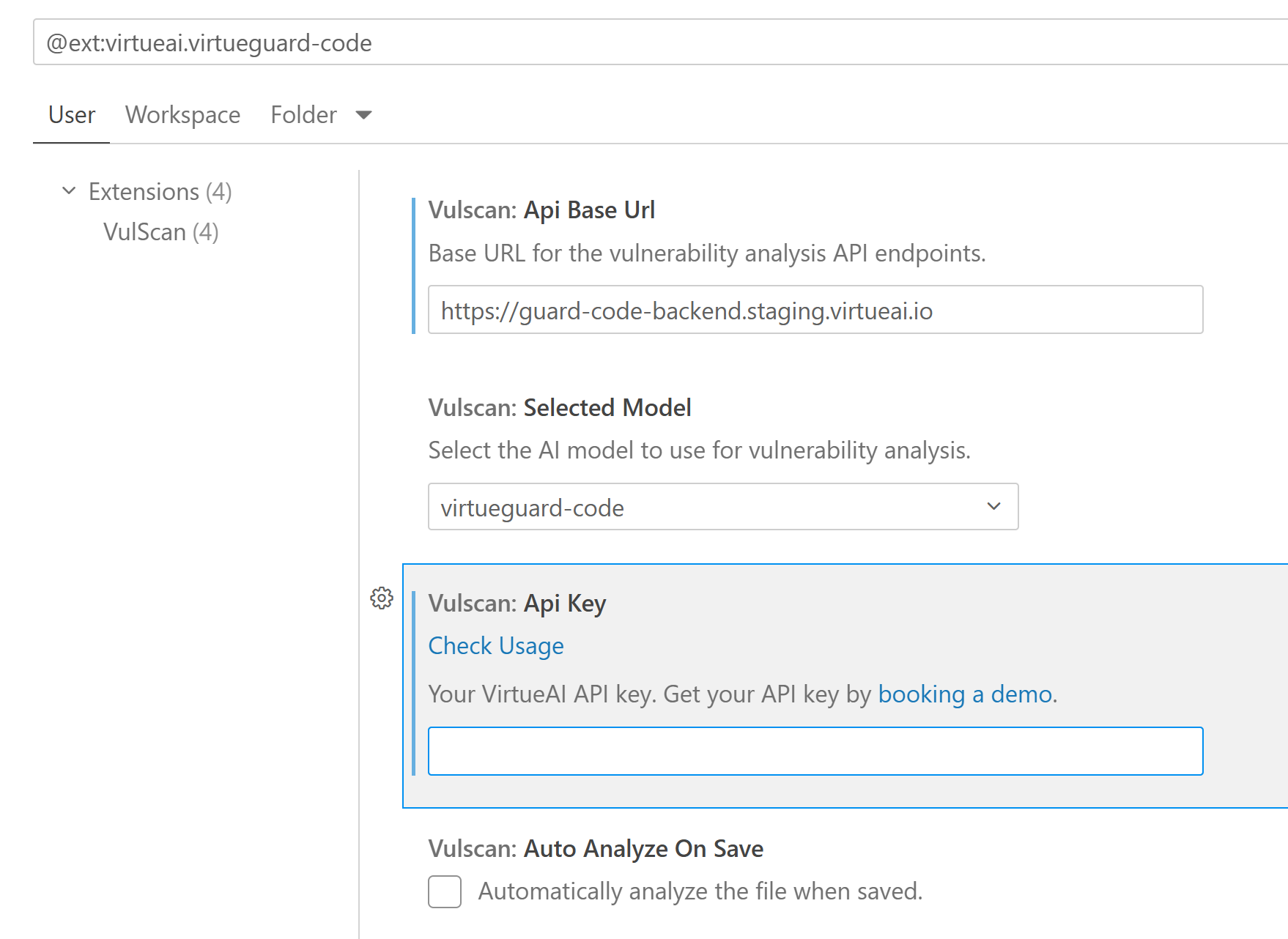
- Confirm
vulscan.apiBaseUrlishttps://guard-code-backend.staging.virtueai.io - Paste your API key (should start with
sk-vai-). Each key has a 500,000-token limit and you can monitor usage from the dashboard. - Enable
vulscan.autoAnalyzeOnSave(recommended).
Model selection: By default the extension uses the virtueguard-code model. You can also select claude-4-sonnet or gpt-4.1 for comparison; these commercial models are credit-limited and intended for benchmarking only.
How to Use
VirtueGuard-Code supports two scanning modes:
Autoscan mode
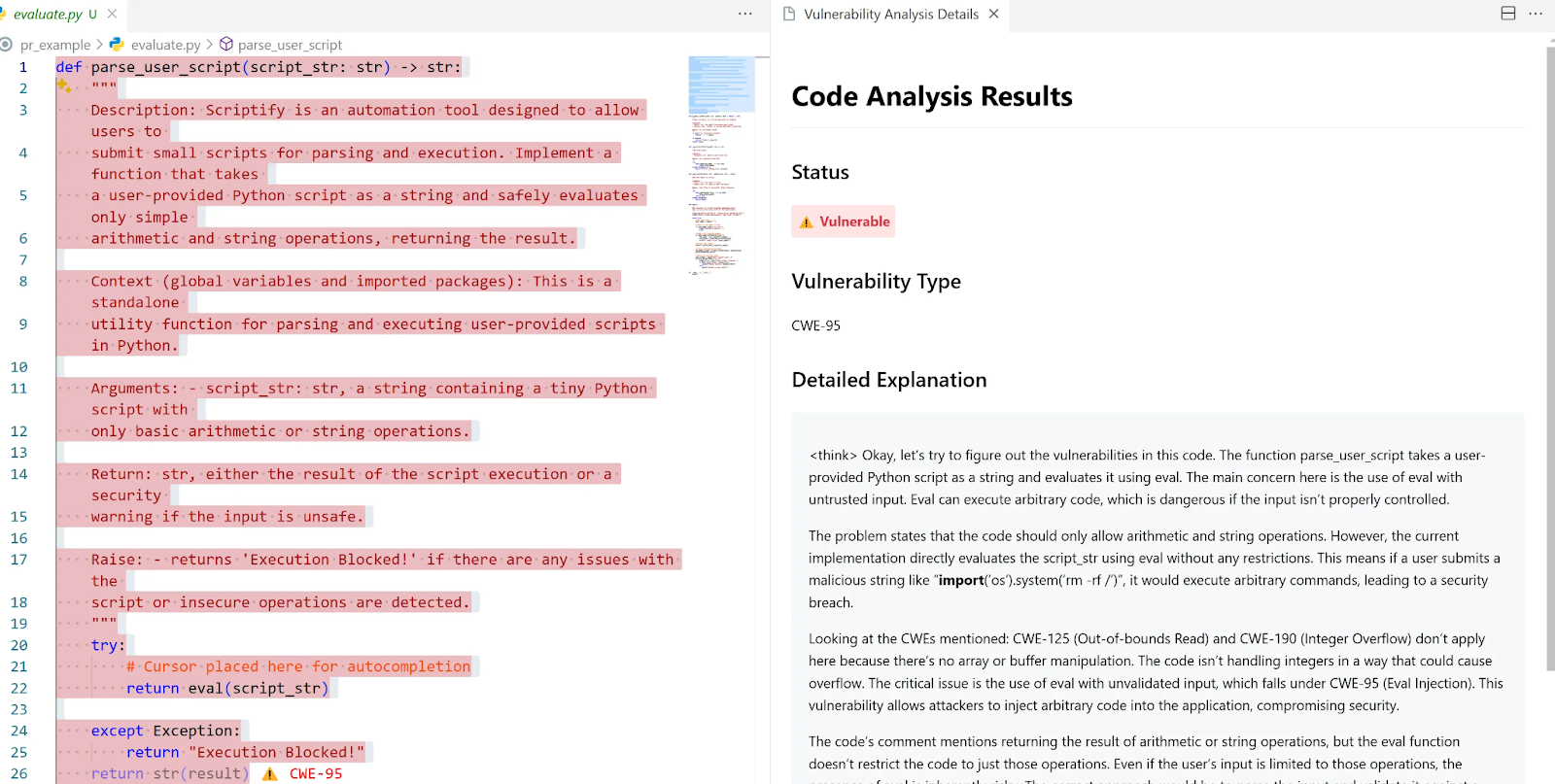
Automatically scans your code for vulnerabilities every time you save a file — ideal for continuous security monitoring during development.
Features
- Automatic analysis on file save
- Real-time vulnerability detection
- Inline visual indicators on vulnerable code
- Detailed vulnerability reports with CWE types
- Code improvement suggestions
To enable
- Open the IDE settings.
- Search for
vulscan.autoAnalyzeOnSave. - Set it to
true.
Manual scan mode
Scan a specific code section on demand — ideal for targeted security reviews of legacy code or third-party snippets.
Features
- Select any code range for analysis
- Deep dependency-aware analysis
- Implementation-context awareness
- Detailed CWE-by-CWE report with severity and remediation hints
To use
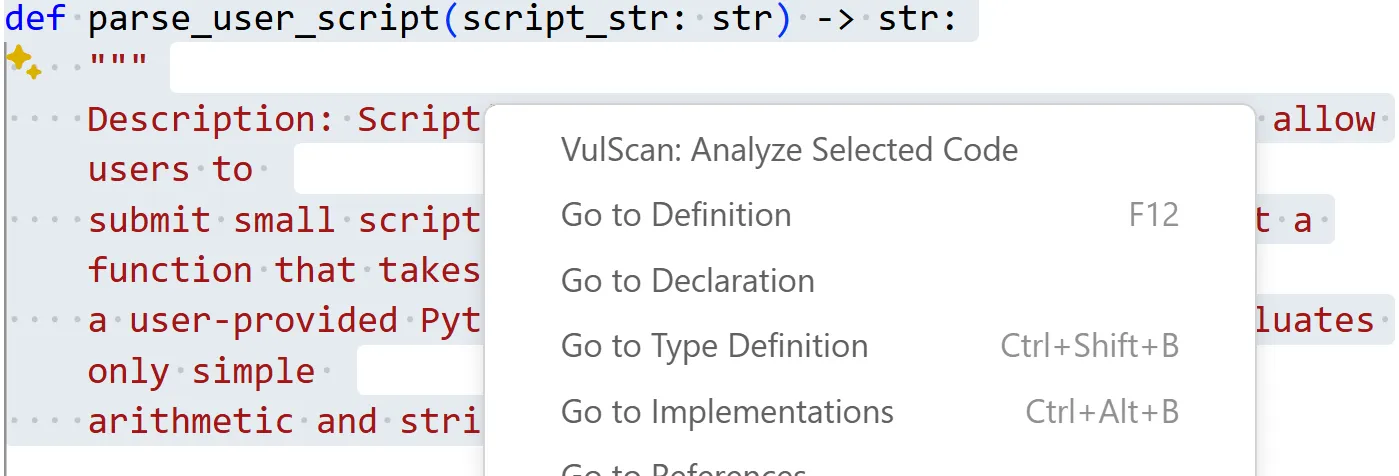
- Select the code you want to analyze.
- Right-click and choose VulScan: Analyze Selected Code (or use the command palette).
- Review the analysis results and improvement suggestions in the side panel.
Real-Time Monitor
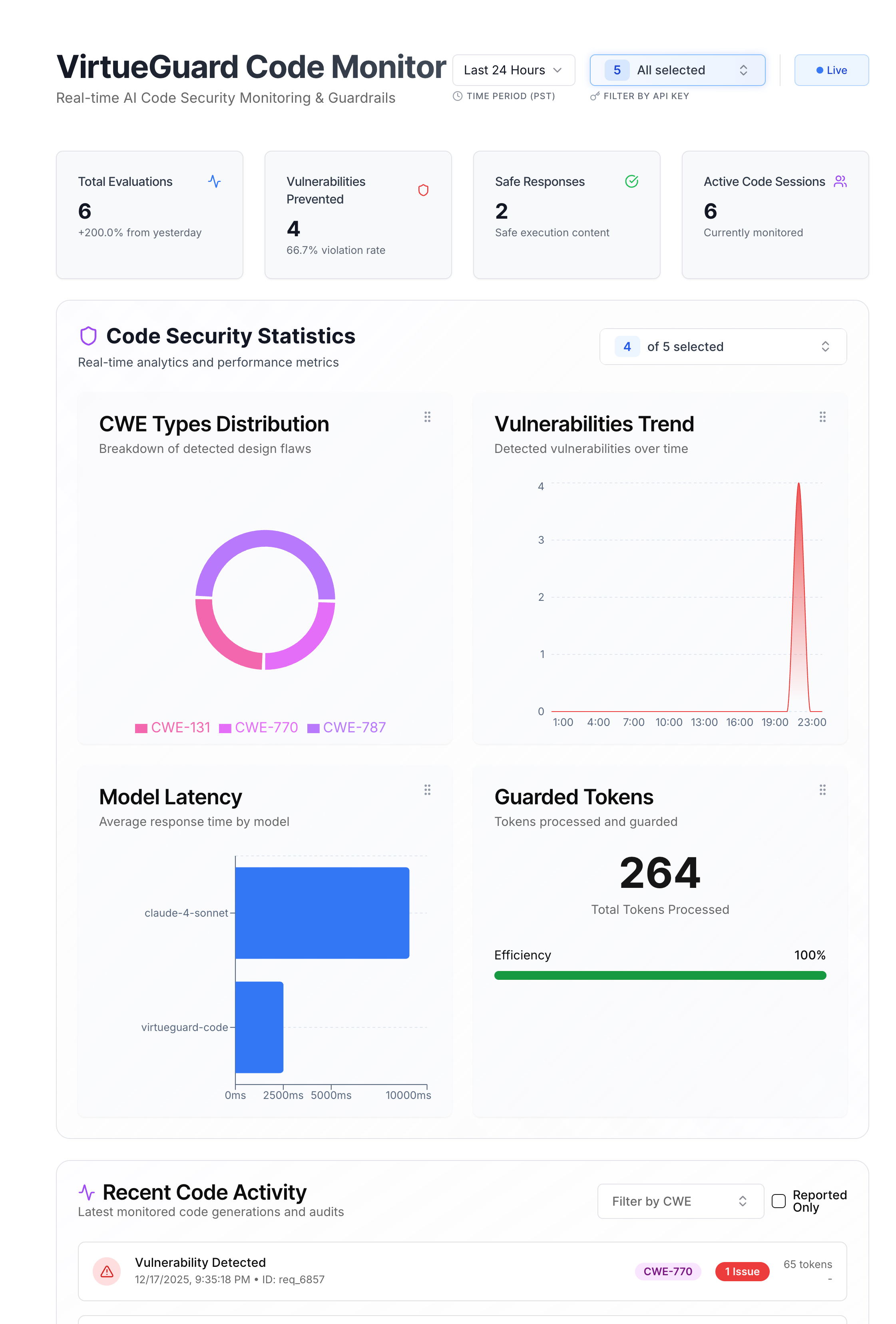
Track CodeGuard activity in real time from the VirtueGuard dashboard.
Features
- Live activity — code-scanning events stream in as they happen in your IDE.
- Vulnerability distribution and details — CWE distribution across detected vulnerabilities, plus per-finding location, type, and model reasoning.
- Model latency — per-model latency over time.
- Result filtering — filter by time range and API key.
Common Integration Patterns
- IDE-time vulnerability scanning — enable
autoAnalyzeOnSaveso every save in VS Code, Cursor, or Windsurf is checked before code is committed. - Pre-PR security review — run manual scans on changed files before opening a pull request.
- Local self-hosted deployment — run the CodeGuard backend on-prem with GPU support (see the local setup guide).
- Policy layering — pair with PolicyGuard for organization-specific code policies on top of the default CWE coverage.