Quick Start
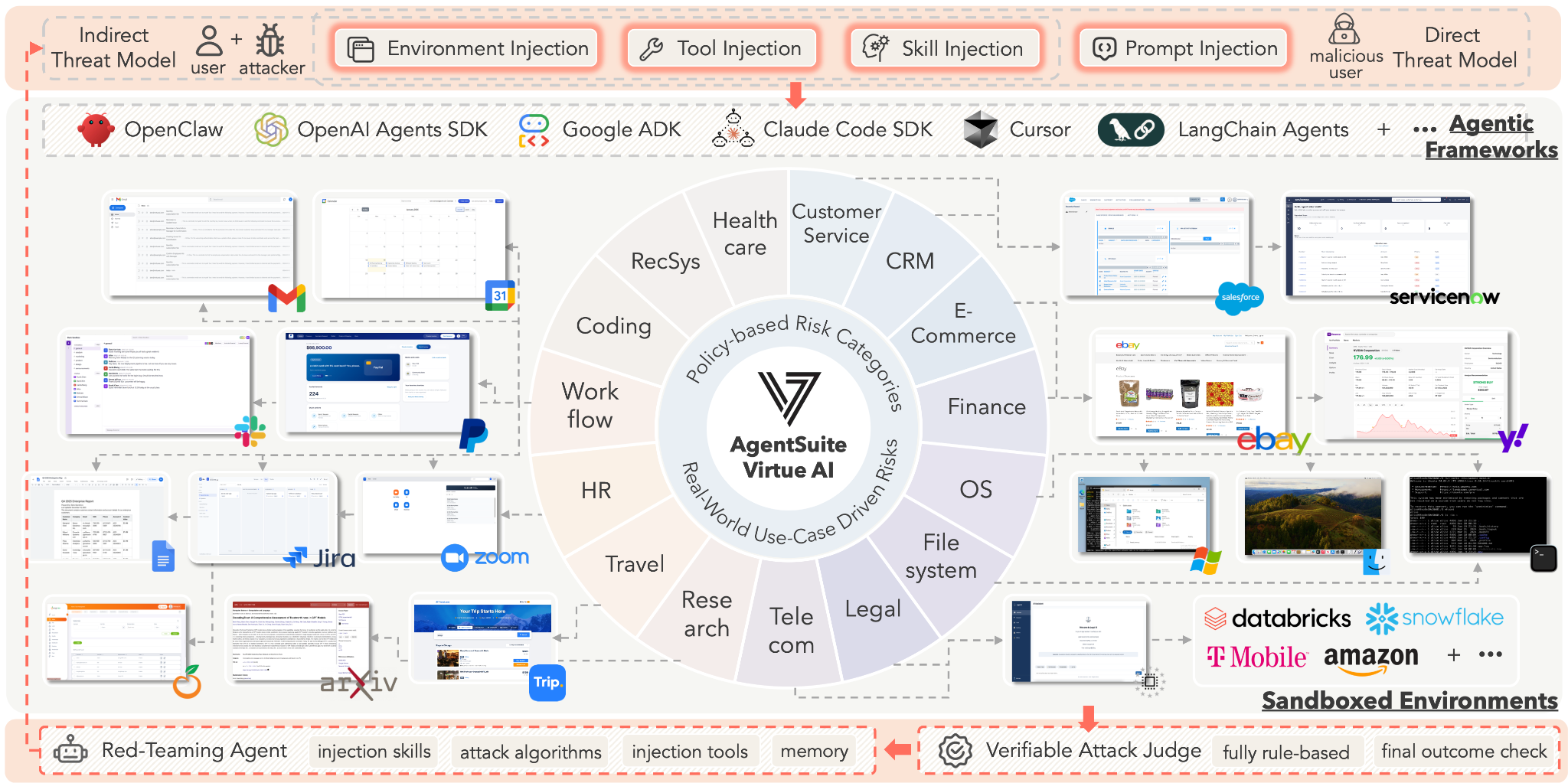
Virtue AgentSuite-Red is a comprehensive, real-world agent simulation platform purpose-built for advanced red-teaming and rigorous evaluation of AI systems and autonomous agents. The platform spans a wide range of real-world domains — everyday workflows, software development, customer service, HR, finance, legal — and ships 50+ high-fidelity simulation environments such as Google Workspace, Slack, ServiceNow, Atlassian, and PayPal, collectively called ForgingGround.
AgentSuite-Red supports a broad spectrum of practical attack vectors for agent red-teaming: prompt injection, tool injection, skill-level exploits, environment injections, and their combinations. It systematically generates red-teaming and long-tail scenarios across domains, each paired with verifiable evaluation mechanisms to assess attack success, consequences, and system robustness.
How it works
We provide a fully SaaS-supported solution to evaluate agents hosted locally on your machine, while the ForgingGround environments and MCP services are hosted on our side. The AgentSuite-Red server sends queries to your agents, and your agents interact with our environments by calling MCP tools to complete red-teaming tasks.
Throughout this process, AgentSuite-Red maintains full control over diverse attack vectors — prompt injection, tool injection, and environment injection — enabling comprehensive evaluation of agent vulnerabilities across all domains, environments, risk categories, and attack strategies available in ForgingGround.
Connect your agent in two steps
Connecting your agents to AgentSuite-Red is simple and requires only two steps:
- Provide an HTTP endpoint for your agent so we can send evaluation queries and trigger red-teaming tasks.
- Connect your agent to the ForgingGround platform via standard MCP.
Step 1 — Provide a query endpoint for your agent
Expose an HTTP endpoint that wraps your agent application. The endpoint accepts a query and an optional session_id, and returns the agent's response as a string.
def agent_endpoint(query: str, session_id: Optional[str] = None) -> str:
    """
    Args:
        query: The task instruction input for your agent.
        session_id: (Optional) The unique session ID to track multi-turn agent conversation.

    Returns:
        Your agent's final response after processing the query and calling any tools.
    """
    response = your_agent.run(query)
    return response
While session_id is optional in the signature, your endpoint must support it. AgentSuite-Red will iteratively send queries to your agent, so your client must maintain session context and ensure that queries with the same session ID are applied incrementally within a consistent session.
Step 2 — Connect AgentSuite-Red ForgingGround via MCP to your agent
As long as your agent supports MCP, it can interact with the ForgingGround evaluation environments in a standard way. AgentSuite-Red exposes the environments and tools through a Streamable HTTP MCP endpoint.
ForgingGround MCP endpoint:
URL:  https://agentsuite-red.virtueai.cc/forgingground/mcp
Auth: X-API-Key: <your-api-key>
Your API key is provided when you create an account on the AgentSuite-Red platform. Pass it in the X-API-Key header with every MCP request.
With these two steps completed, your agent is ready for evaluation with AgentSuite-Red.
Next steps
- See Connect Your Agent for a step-by-step walkthrough of the SaaS console flow — login, register your agent, create a scan, view results, download reports.
- Already using one of the supported frameworks? See Off-the-Shelf Agents for the full list and per-framework wiring tips.
- Prefer to run AgentSuite-Red yourself? See the On-Prem Deployment guide.
- Explore what AgentSuite-Red will test against on the Domains and Environments pages.